
Download Osfoora – Mac Twitter Client, Secure, Free, Easy‑to‑Use
Why Osfoora Stands Out on macOS
Osfoora for Twitter is a dedicated Mac‑only client that brings the fast‑paced world of Twitter straight to your desktop. Designed exclusively for macOS X and newer versions, this full‑version software belongs to the Internet‑software category under Chat & Communication. Since its debut in 2016, Osfoora has been praised for its clean interface, real‑time notifications, and a set of tools that power users love—like advanced tweet scheduling, multi‑account handling, and built‑in analytics. Even though the download count is modest, the app’s steady updates—most recently on 1 April 2017 (version 1.3.5)—show a commitment to security and compatibility. The program is offered completely free of charge, making it an attractive alternative to the official Twitter web client or heavier, subscription‑based apps.
In a landscape where many Twitter tools demand a Windows or mobile environment, Osfoora fills a niche for Mac enthusiasts who want a native experience. It runs silently in the menu bar, consumes minimal resources, and respects macOS’s design language, ensuring that you can stay connected without sacrificing performance. Whether you’re a casual tweeter, a social‑media manager, or a developer tracking hashtags for research, Osfoora’s blend of simplicity and power makes it worth a download.
Feature‑Rich Overview & Complete Feature List
What You Get When You Install Osfoora
- Native macOS menu‑bar integration for instant access.
- Support for unlimited Twitter accounts with seamless switching.
- Real‑time push notifications for mentions, retweets, and DMs.
- Advanced tweet composer with markdown‑style shortcuts and media attachment.
- Powerful search filters, hashtag tracking, and saved searches.
- Built‑in analytics dashboard showing tweet impressions, engagement, and follower growth.
- Tweet scheduling and automatic posting for optimal timing.
- Customizable themes that match macOS Light and Dark modes.
- Secure OAuth authentication with no storage of passwords.
- Automatic updates that keep the client compatible with Twitter API changes.
Osfoora’s feature set is built around the idea of “do more with less.” The app’s lightweight architecture ensures that background processes stay under the radar, while the UI stays responsive even when handling high‑volume streams. The multi‑account feature is particularly valuable for marketers managing several brand profiles; you can switch accounts with a single click, and each account retains its own notification settings and preferences.
The analytics dashboard, while not as exhaustive as enterprise‑level tools, gives you quick insights into which tweets are resonating. You can export data to CSV for deeper analysis, a handy option for reporting. Finally, the scheduling feature eliminates the need for third‑party services—simply compose, set a time, and let Osfoora handle the rest, all within a secure, OAuth‑verified environment.
Step‑by‑Step Installation & Everyday Usage Guide
Getting Osfoora Up and Running on Your Mac
Installing Osfoora is straightforward, designed for users of all technical levels. First, navigate to the official download page and click the “Download for macOS” button. The file arrives as a standard .dmg package. Open the disk image, then drag the Osfoora icon into your Applications folder. macOS may warn you about an unidentified developer; simply right‑click the app, select “Open,” and confirm you trust the source. The app will then launch and prompt you to log in using Twitter’s OAuth flow—your credentials never touch Osfoora’s servers.
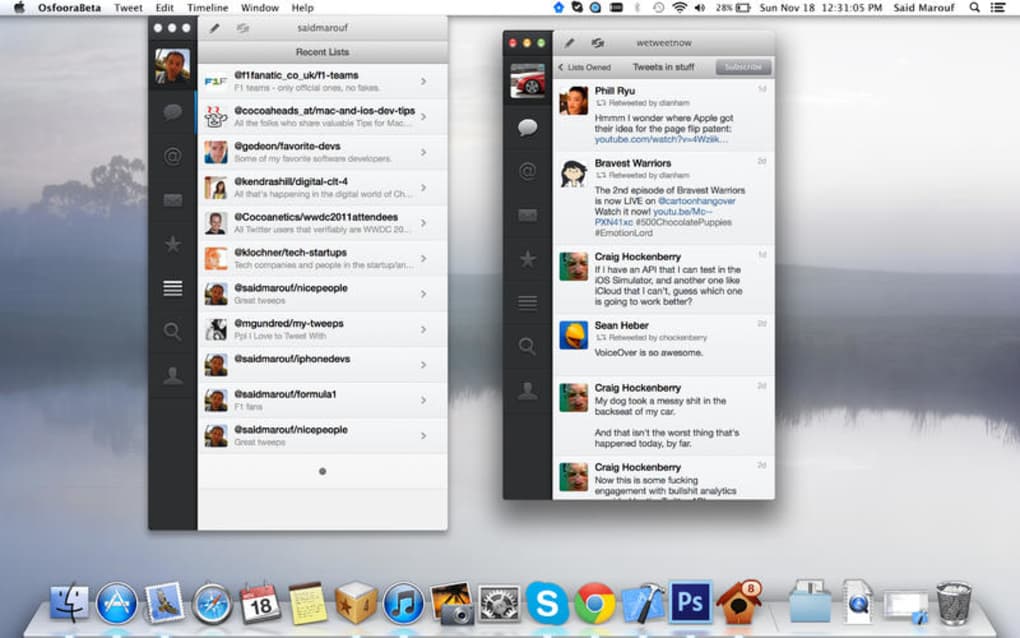
Once authenticated, you’ll see the Osfoora icon appear in the menu bar. Clicking it reveals a compact window with your timeline, mentions, and direct messages. The interface mirrors familiar Twitter elements, but adds shortcuts: ⌘N opens a new tweet composer, ⌘S schedules the current tweet, and ⌘F opens a quick search box. You can customize notification preferences by right‑clicking the menu‑bar icon and selecting “Preferences.” Here you can enable or mute alerts for specific accounts, choose sound cues, and decide whether to display badge counts.
Daily use is streamlined. The tweet composer supports drag‑and‑drop of images, GIFs, and videos. To schedule a tweet, click the calendar icon within the composer, choose a date and time, and hit “Schedule.” Osfoora stores scheduled posts locally and automatically publishes them even if the app is closed, thanks to a background daemon that runs with macOS’s launch agents. For power users, the “Advanced Search” panel lets you build complex queries using operators like from:, since:, and #hashtag. Results appear in a separate tab, and you can save these searches for future reference.
Compatibility, Pros & Cons – The Full Verdict
Is Osfoora the Right Choice for Your Setup?
Osfoora is built exclusively for macOS, supporting macOS X 10.10 (Yosemite) and all later releases, including the current macOS Ventura and Sonoma. The application is optimized for both Intel and Apple‑Silicon (M1/M2) architectures, delivering native performance without the need for Rosetta translation. Because it is a desktop‑only client, there is no iOS or Android version, making it ideal for users who prefer to keep their social media activity on a dedicated workstation rather than on mobile devices.
Pros
- Native macOS experience with menu‑bar integration.
- Free to download and use, with no hidden subscription fees.
- Supports unlimited Twitter accounts and quick switching.
- Robust notification system that keeps you informed in real time.
- Advanced features such as tweet scheduling, analytics, and saved searches.
- Lightweight footprint—low CPU and RAM usage.
- Secure OAuth login; no password storage.
- Regular updates ensure compatibility with Twitter API changes.
Cons
- Only available for macOS; no Windows, Linux, or mobile versions.
- Installation size is not disclosed, which may concern users with limited disk space.
- Limited customization beyond Light/Dark themes.
- Analytics are basic compared to enterprise‑grade tools.
- No built‑in ad‑blocking or content filtering features.
FAQ – Frequently Asked Questions About Osfoora
Is Osfoora completely free or does it offer in‑app purchases?
Osfoora is a free‑to‑download application with no hidden fees. All core features—including multiple accounts, scheduling, and analytics—are available without any in‑app purchases.
Can I use Osfoora on a Mac with an Apple Silicon (M1/M2) chip?
Yes. Osfoora runs natively on both Intel‑based Macs and Apple Silicon devices, delivering the same performance and low resource usage across all supported hardware.
How does Osfoora handle my Twitter login credentials?
The app uses Twitter’s OAuth authentication. Your password never touches Osfoora’s servers; instead, Twitter issues a token that the app stores securely on your Mac.
Is there a way to export my tweet analytics from Osfoora?
Yes. The analytics dashboard includes an “Export CSV” button, allowing you to download impressions, retweets, likes, and follower growth data for offline analysis.
What macOS versions are supported by the latest Osfoora release?
The current version (1.3.5) supports macOS X 10.10 (Yosemite) and newer, including the latest Ventura and Sonoma releases.
Conclusion – Should You Download Osfoora Today?
If you spend a significant amount of time on Twitter and prefer a dedicated desktop client that respects macOS aesthetics, Osfoora is a compelling choice. Its free model, native performance, and robust feature set—ranging from multi‑account support to tweet scheduling—make it a practical tool for both casual users and social‑media professionals. While the lack of a Windows or mobile version limits cross‑platform usage, the app excels within its niche, delivering a secure and responsive experience without the bloat of larger communication suites.
The pros clearly outweigh the cons for Mac‑only users: you get a lightweight, secure client that stays up‑to‑date with Twitter’s API, all while keeping your data safe via OAuth. The minor drawbacks—such as basic analytics and the absence of a Windows version—are unlikely to affect users whose workflow centers around a Mac. In short, Osfoora offers enough value to merit a download, especially if you appreciate a clutter‑free, menu‑bar Twitter client.
Ready to boost your Twitter productivity? Click the download button below to install Osfoora for free, and start enjoying a smoother, more organized timeline today.







